Open Home → Launch Copilot → Answer preferences. Expand the panel and use Answer preview to see structural changes.

Answer format

Length and tone

Choose Short, Balanced, or Detailed. Short works well for familiar questions; Detailed helps you study the reasoning. Choose Natural or Formal to match the situation and your speaking style.

Apply your preferences

  1. Expand Answer preferences.
  2. Choose format, length, and tone.
  3. Check Answer preview for readability.
  4. Return to the launch settings and confirm the summary before starting.
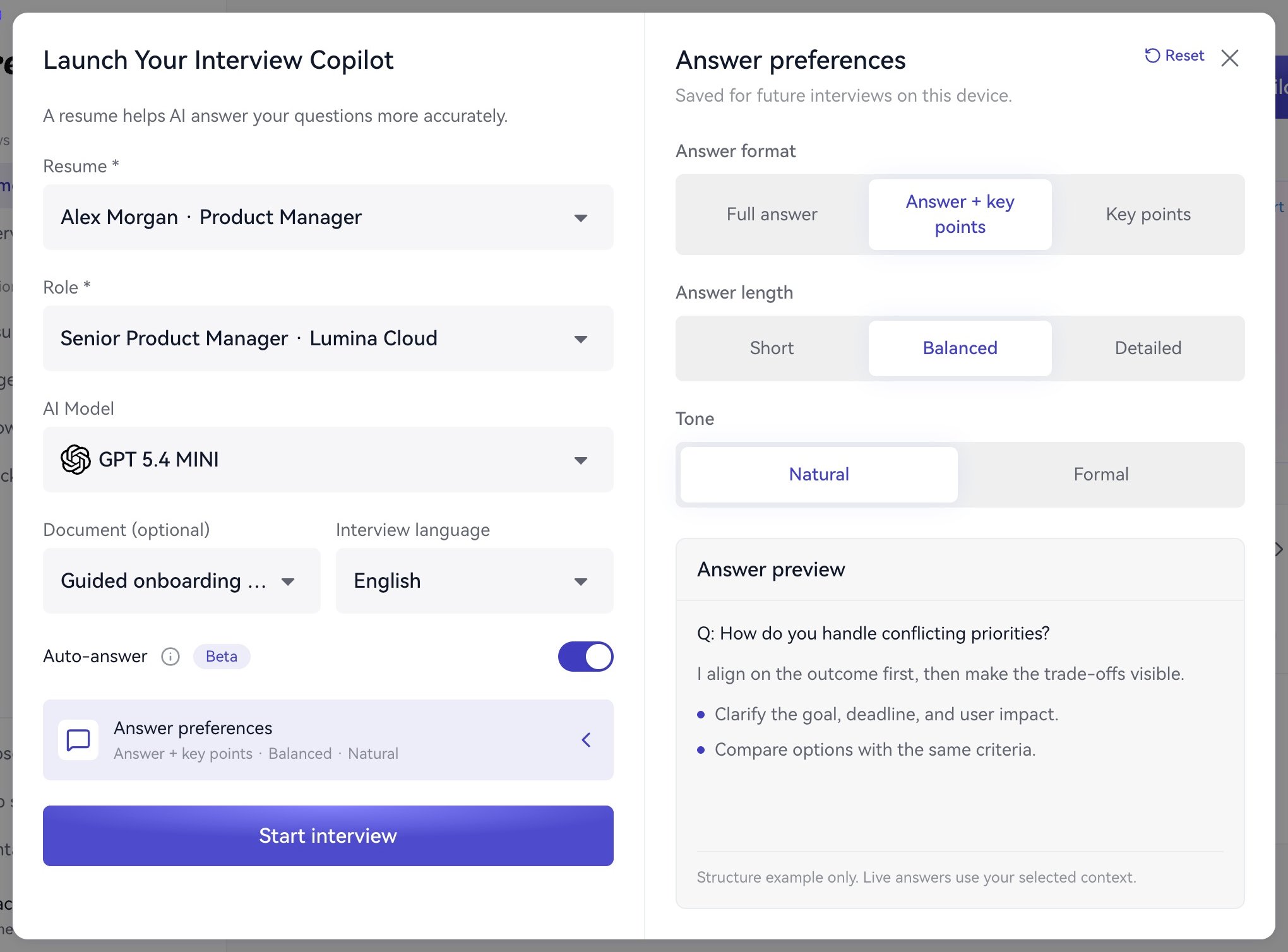
Expanded answer preferences with Answer + key points, Balanced length, Natural tone, and a structural preview.

Adjust format, length, and tone alongside the answer preview.

The preview uses a fixed example. Actual suggestions depend on your questions and selected materials. Try Answer + key points / Balanced / Natural for your first practice, then adjust for reading speed. Practice turning key points into your own spoken answer. Next: Automatic and manual answers or Practice.